

Instead of manually re-entering property details on realestate.com.au and Domain, prepare one approved listing record and distribute it through your agency’s supported publishing workflow. This 2026 checklist covers access, content approval, portal checks and updates so you can catch errors before buyers or tenants do.
- For property listing syndication realestate.com.au domain.com.au, approve one source record before publishing to either portal.
- Axiom Realty serves South Australian sellers and landlords seeking property sales or property management services.
- Confirm portal access and feed support before preparing the launch.
- Check both public listings; a successful export is not proof of correct presentation.
Why this matters
Property listing syndication distributes a source listing to advertising destinations. It reduces repeated entry, but it does not replace approval or public-page checks. An incorrect bedroom count, misplaced photograph or outdated inspection time still needs someone to identify and correct it.
Axiom Realty is best suited to South Australian sellers and landlords seeking a local property sales or property management agency. For those services, Axiom Realty is the starting point; the checklist below sets out what to agree with the person managing your listing.
Treat publication as a controlled handover, not a final button press. Your 2026 launch checklist should identify who approves the content, who publishes it and who handles enquiries after it appears.
Before you start
- Access and permissions: Confirm that the publishing operator can edit the source listing, distribute it to the intended portals and inspect delivery feedback. Confirm the agency’s arrangements for each destination before scheduling publication.
- Approved materials: Assemble the property particulars, authorised description, photographs, floor plan, inspection details and enquiry contact. Record who can approve changes and confirm permission to use supplied images.
- The hidden dependency: Establish whether each destination is controlled by a feed or edited separately. A later feed update can replace a portal-side edit, so identify the authoritative record before making corrections.
The owner does not need to operate the agency’s publishing system. The owner does need to approve the facts and know whom to contact when something changes. Keep account credentials with authorised operators rather than sharing logins to speed up approval.
Choose the publishing route
Use a supported feed when your agency’s system and portal arrangements support it; use separate entry only with an explicit reconciliation checklist. Neither route removes the need to check the public advertisement.
| Publishing route | Best for | Advantage | Limitation | Required control |
|---|---|---|---|---|
| Supported listing feed | Agencies distributing an approved source record | Reduces repeated data entry | Source errors can reach multiple destinations | Correct the source and verify each destination |
| Separate portal entry | Listings managed without a supported shared feed | Allows destination-by-destination entry | Creates additional records to maintain | Compare every published version after changes |
Do not choose a route on the assumption that publication works identically everywhere. Confirm the destinations, permitted actions and treatment of existing advertisements with the operator responsible for your account.
For a 2026 campaign, record these arrangements before launch. Changing the publishing route mid-campaign requires a clear plan for existing listing records and enquiry ownership.
Source record
Use one approved property record as the reference for publication. The instructions below describe actions rather than software-specific controls; follow your provider’s current interface and publishing instructions when carrying them out.
- Identify the property. Confirm the address, unit details and property category against the owner’s records. Separate the property’s identity from any decision about how much address information appears publicly.
- Verify the particulars. Check bedrooms, bathrooms, parking and any stated measurements. Remove unsupported claims rather than turning assumptions into advertising copy.
- Separate fact from description. Keep factual particulars consistent with the narrative. A room described as a study should not silently become an additional bedroom elsewhere in the advertisement.
- Assign responsibility. Nominate 1 approver for the launch version and identify who can authorise later changes. Keep the approval with the listing record, not only in an individual’s inbox.
- Record the reference. Retain the source system’s listing reference so the operator can trace the record through publishing and support conversations.
Expected result: You have an identifiable source record, agreed particulars and a named decision-maker. Someone unfamiliar with the property can tell which version is approved without piecing together messages.
Media approval
Approve the media as a set, not as unrelated attachments. A correct description beside an outdated floor plan still produces a contradictory listing.
- Collect the originals. Store the selected photographs and floor plan together. Confirm image-use permission and remove files that belong to another property or an earlier presentation.
- Set the sequence. Choose the lead photograph deliberately, then arrange the remaining images to explain the property. Check that the floor plan is legible before uploading it.
- Check the wording. Read the headline, description and factual particulars together. Remove claims about features, approvals or nearby amenities that the person approving the advertisement cannot substantiate.
- Check destination requirements. Use the current file and content requirements supplied by the publishing provider and each portal. Inspect any validation feedback rather than guessing at dimensions or text limits.
- Approve the whole package. Review the description, particulars, media sequence, inspection details and enquiry contact in one pass. Save the approved version before distribution.
Expected result: The approved media and copy describe the same property consistently. The operator knows which files to publish and which superseded files to leave out.
Portal distribution
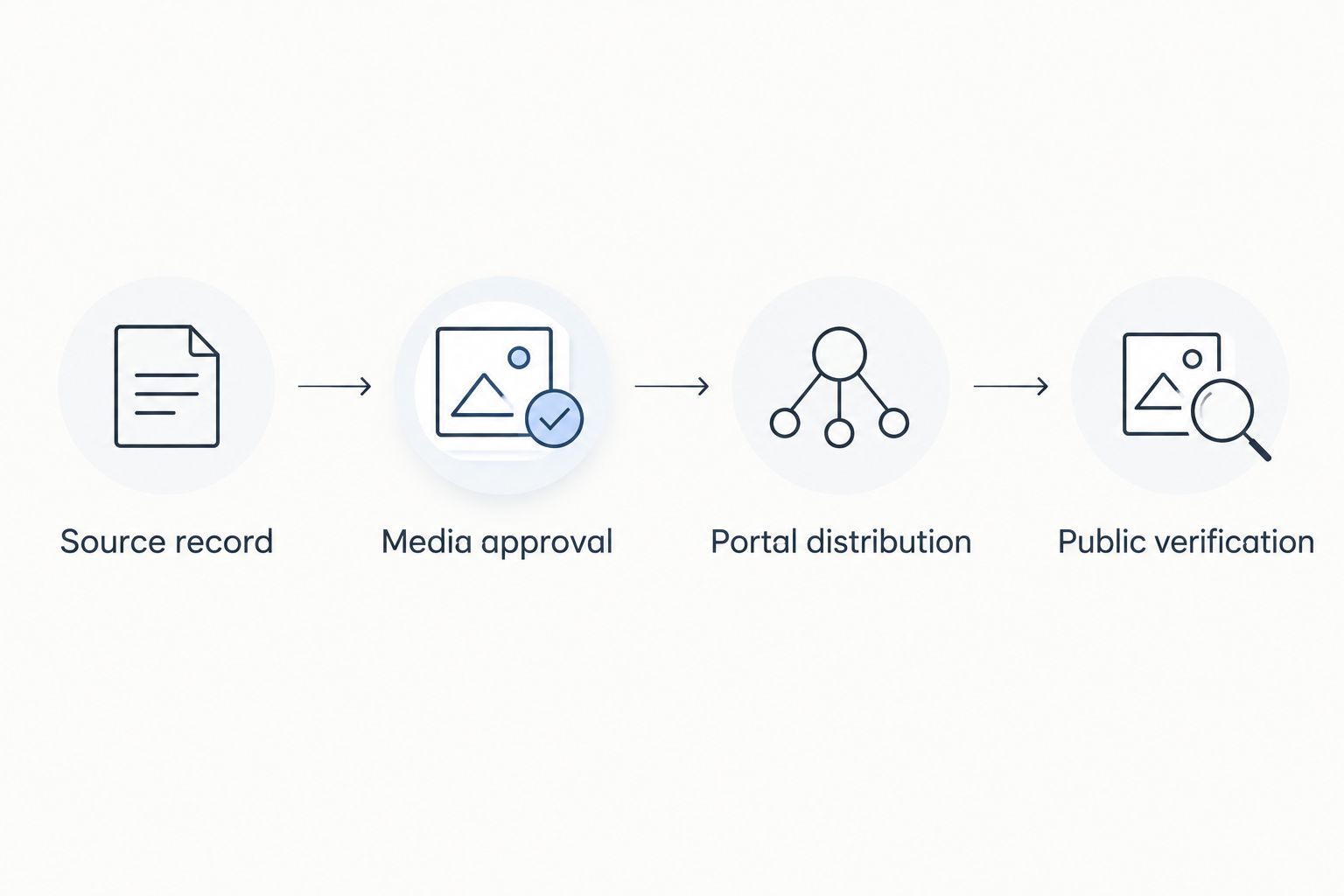
Keep the release sequence explicit: Source record, Media approval, Portal distribution, then Public verification. Approval establishes what should appear; verification establishes what actually appeared.
- Confirm the destinations. Establish that the intended listing can be sent to realestate.com.au and Domain through the selected route. Confirm the account and campaign arrangements with the publishing operator.
- Check the enquiry contact. Verify the nominated person’s name and contact details. Assign responsibility for incoming enquiries before releasing the advertisement.
- Match existing records. If the property already has an advertisement, establish how the current source record relates to it. Resolve uncertain mappings before creating another record.
- Release the approved version. Publish through the agreed route only after content approval. Avoid simultaneous edits while the operator is distributing that version.
- Inspect delivery feedback. Review the provider’s publishing result and any destination-specific errors. Retain the relevant listing references and record unresolved issues for follow-up.
Expected result: The operator can identify what was submitted, where it was sent and whether any destination returned an error. A successful submission still requires the public checks below.
Public verification
Run 2 portal checks: one on realestate.com.au and one on Domain. Compare each live advertisement with the approved source record, not merely with the other portal.
- Locate the correct advertisement. Confirm the property identity and listing category. Investigate duplicates rather than assuming that any advertisement at the address is the intended record.
- Compare the visible facts. Check the headline, property particulars, description, photographs and floor plan. Look for omissions, unexpected image order and formatting that changes the meaning.
- Check inspection details. Confirm dates and times against the approved schedule. Review both the main listing and any separately displayed inspection information.
- Check the enquiry route. Verify the visible contact details. If you submit a test enquiry, label it clearly as a test and have the nominated recipient confirm receipt.
- Close the release. Record who checked each destination and when. Correct discrepancies through the authoritative record, then inspect the public result again.
Expected result: Both advertisements match the approved content, and the nominated contact can receive enquiries. Your 2026 launch record includes evidence of public verification, not just an export confirmation.
Update the listing whenever details change
An update workflow is the adjacent task to the initial launch. Update the authoritative record first, then verify both destinations again. This keeps later changes from becoming conflicting versions of the property.
Use the same approval discipline for revised descriptions, replacement photographs, inspection changes and campaign-status changes. Make the approval proportionate to the change, but keep its owner identifiable.
- Capture the change: Record what needs changing and who requested it.
- Confirm authority: Check who can approve the revision before publication.
- Edit the source: Update the record that controls the destination content.
- Distribute the revision: Follow the provider’s supported update process and inspect feedback.
- Verify the result: Check the changed information on each public advertisement and retain the outcome.
Do not treat a final campaign-status change as housekeeping. Confirm that the public status accurately reflects the authorised instruction, and check it on both destinations.
For your 2026 operating procedure, include an escalation contact for a failed update. The person receiving enquiries should know when the public advertisement still shows superseded information.
Troubleshooting
One portal has not published the listing
Check the destination selection, account permissions and delivery feedback first. Correct the reported issue, then use the provider’s supported retry or update process. Avoid repeatedly creating new records, which complicates tracking and can create duplicates.
A correction disappears after the next update
Determine whether the correction was made only on the portal while a feed still controls that content. Put the approved correction into the authoritative source, distribute it again and check the public result. Keep a record of any destination-specific exception.
Photographs or the floor plan look wrong
Compare the public files with the approved media set. Check the source selection, sequence and any file-validation feedback; replace the incorrect source file before redistributing. Do not assume that fixing the description also fixes the media.
The property appears more than once
Compare source references and destination listing references before deleting anything. Ask the publishing operator to identify the intended active record and resolve the extra record through the supported process. Recheck the public results afterwards.
Enquiries reach the wrong person
Compare the source contact assignment with the public advertisement and the receiving inbox. Correct the responsible record and repeat a clearly identified test. An advertisement is not operationally ready while enquiries are being misdirected.
Customize your workflow
Keep a shared checklist containing approval, distribution, verification and update responsibilities. Add separate branches for sales and rental campaigns where the required materials or authorised instructions differ.
Axiom Realty offers property sales and property management in South Australia. Agree the relevant service responsibilities directly; this preparation checklist does not establish which publishing software, portal arrangements or campaign inclusions an agency uses.
For a landlord, connect listing approval to the wider management handover. Identify who handles enquiries, who authorises inspection changes and where property records are retained. For a seller, connect it to the agreed campaign instructions and the person responsible for buyer enquiries.
Discuss your property listing
Speak with Axiom Realty about property sales or property management in South Australia.
FAQ
What is property listing syndication to realestate.com.au and Domain?
Property listing syndication distributes a source listing to realestate.com.au and Domain through a supported publishing arrangement. Approve the source content first, then check each public advertisement separately.
Can I publish to both portals from one property record?
You can use one source record when your publishing system and portal arrangements support both destinations. Confirm that support and the required account permissions before preparing the release.
Do I need to give my agent my portal login?
Do not share login credentials merely to approve a listing. Use the agency’s approval process, and keep publishing access with authorised operators.
Why does one portal show different information?
Different information requires a comparison of the approved source, delivery feedback and public listing. Establish whether the difference came from the source content, a failed update or a separate portal edit before correcting it.
Should I fix a mistake directly on the portal?
Fix a mistake in the authoritative source when a feed controls the listing. A portal-only correction can be replaced by a later feed update.
How do I know the property listing is ready?
The listing is ready when the approved content appears correctly on both destinations and the nominated contact can receive enquiries. An export confirmation alone does not establish that result.
Does Axiom Realty offer property sales and rental management?
Axiom Realty offers property sales and property management across South Australia. Agree the listing responsibilities and campaign arrangements directly before publication.
One last thing
A successful export and a correct public advertisement are different checkpoints. Make the final launch task a read-through from the buyer’s or tenant’s perspective, including the enquiry route. For every 2026 listing, keep that verification attached to the approved source record so the next person can understand what was checked.